
365 Elevator AI Prompt: The Full Edit Prompt, Line by Line
365 elevator AI prompt: read the full 309-word edit prompt our generator runs now, every part explained, and how two photos make the video for $9.90 at 720p.
 365 Elevator AI Team18 min read
The 365 Elevator AI team: we watch every elevator clip we write about, date every view count we quote, and read each price on the tool's own page the day we write.

TL;DR — The 365 elevator AI prompt is a 309-word edit prompt in 9 sentences. It edits the 14-second elevator take: photo 1 takes the walk-in spot, photo 2 takes the singer's spot, and everything else stays. It's the exact text our 365 elevator AI generator runs behind its Create button, copied below and read part by part. Skip the prompt by putting two photos on the two pins to get the 14-second video with "365" under it for $9.90 at 720p.
Under the elevator posts on TikTok, viewers ask "How do you make this effect?" in top comments that draw 534 to 735 likes each. Some commenters also ask "Wie macht man diesen Effekt?" (German for "how do you make this effect?").
Many guides send you to a 365 elevator trend CapCut template (a ready-made edit inside the CapCut app that you drop a picture into). MakeViral's FAQ says no creator of the trend shared a prompt: "No creator of the trend shared a prompt, and the CapCut template shows none." Other prompts around the web have both people stare at the camera. That drops the joke, because one person sings while the other tunes out.
Here's what you get: the 309 words our generator runs, copied from it word for word, along with what each part does.
- The full prompt: You'll get the 309-word 365 elevator AI prompt in a plain-text box ready to copy.
- A part-by-part read: You'll see what each of the 5 parts tells the edit across the 14-second clip.
- What you need: You'll find out what inputs and steps you'll use when you run the prompt yourself.
- Six mistakes to skip: You'll spot common setup slips on your own run and see what to do instead.
- The two-photo route: You'll see how two photos give you the 14-second video with "365" under it.
The 365 Elevator AI Prompt to Copy (309 Words)
The 365 elevator AI prompt below is the full text our generator sends with every pair of photos, as of November 27, 2026.
Edit @Video1 by replacing both performers in every frame: replace the person on the left who walks in wearing a pale blue long-sleeve draped dress and high bun with the person in @Image1, and replace the person on the right already inside wearing a black tuxedo, white shirt, black bow tie, and short dark curly hair with the person in @Image2. Each keeps their own face, hair, skin tone, age, gender, build, and clothing (or character appearance) from their photo, with none of the original tuxedo, bow tie, dress, bun, or hairstyles remaining unless shown in the photo. They never swap places and their faces never mix. Match the timing of @Video1: at 0s, the doors open on the person in @Image2 alone inside, singing to the camera with a raised hand; at 1s, the person in @Image1 walks in on the left with their back to the camera; from 2s to 4s, they turn around, push a white wired earbud into their ear, and glance at their phone; from 5s to 13s, they stand still and tuned out, eyes half shut or neutral, never reacting. Only the person in @Image2 mouths the song moment by moment with hand gestures around 0s, 4s-6s, 9s, and 12s-13s, while the person in @Image1 keeps their lips closed throughout. Both match the original expressions without exaggeration. Keep the brushed-steel lift panels and doors, two ceiling strip lights, doors sliding open at the start, phone and white wired earbuds on the person in @Image1, lighting, camera position, slight push-in, framing, lens, motion blur, and timing exactly as in @Video1, with exactly two people and nobody added. There are no watermarks, logos, captions, stickers, or overlays in @Video1; keep the frame free of them. Produce a clean, sharp, true-to-life image with clear detail on both faces and no added captions, watermarks, text, or logos.Press "Copy prompt" under the box to take all 309 words. Since it's plain text, you don't have anything to download.
You can see the video the prompt edits in the trend's own post by @neoausdermatrix33 on TikTok. It went up on 21 November 2026 and had 1.2 million views on 23 November 2026.
This clip shows the trend's 14-second take in one continuous shot in 4:3 (a frame a bit wider than it is tall; the post is 962 × 720 pixels). Inside the prompt, you'll see this take called @Video1.
Line by Line: What the 365 Elevator AI Prompt Tells the Edit
The 365 elevator AI prompt has 5 parts: who goes where (61 words), what the photos give (46), the beats (116), what stays (49) and a clean frame (37).
| Part | Words | Key line | What it tells the edit |
|---|---|---|---|
| 1. Who goes where | 61 | "Edit @Video1 by replacing both performers" | Put photo 1 where the woman in the pale blue dress walks in and photo 2 where the man in the tuxedo sings. |
| 2. What the photos give | 46 | "They never swap places and their faces never mix." | Take each face, hairstyle and outfit from its own photo, and leave the old clothes and hair behind. |
| 3. The beats | 116 | "Match the timing of @Video1" | Keep the doors, the walk-in, the earbud and the tune-out on their seconds, with only photo 2 singing. |
| 4. What stays | 49 | "Keep the brushed-steel lift panels and doors" | Hold the lift, the lights, the phone, the earbud and the camera as they are, with nobody added. |
| 5. A clean frame | 37 | "Produce a clean, sharp, true-to-life image" | Leave the picture clear of captions and text, with both faces sharp. |
The word counts come from the prompt above, and the 5 parts add up to its 309 words.
"Edit @Video1 by replacing both performers…": Say Who Goes Where
Using "Edit @Video1 by replacing both performers in every frame" tells the editor it's changing the take, not making a new video. And it's both people, for all 14 seconds.
- Photo 1, on the left: Your photo 1 takes the place of "the person on the left who walks in wearing a pale blue long-sleeve draped dress and high bun", since the prompt swaps that person "with the person in @Image1".
- Photo 2, on the right: Your photo 2 takes the place of "the person on the right already inside wearing a black tuxedo, white shirt, black bow tie, and short dark curly hair", since the prompt swaps that person "with the person in @Image2".
Each person's face, hair, skin tone, build and clothes come from their own photo, starting with "Each keeps their own face, hair". None of the old look stays, as the line says "with none of the original tuxedo, bow tie, dress, bun, or hairstyles remaining unless shown in the photo". A character works too, since the prompt allows "(or character appearance)".
"They never swap places and their faces never mix." keeps photo 1 on the left and photo 2 on the right through the whole take.
No person's name, account name or song title appears anywhere in the 309 words. Where this take comes from is in the 365 elevator trend explained.
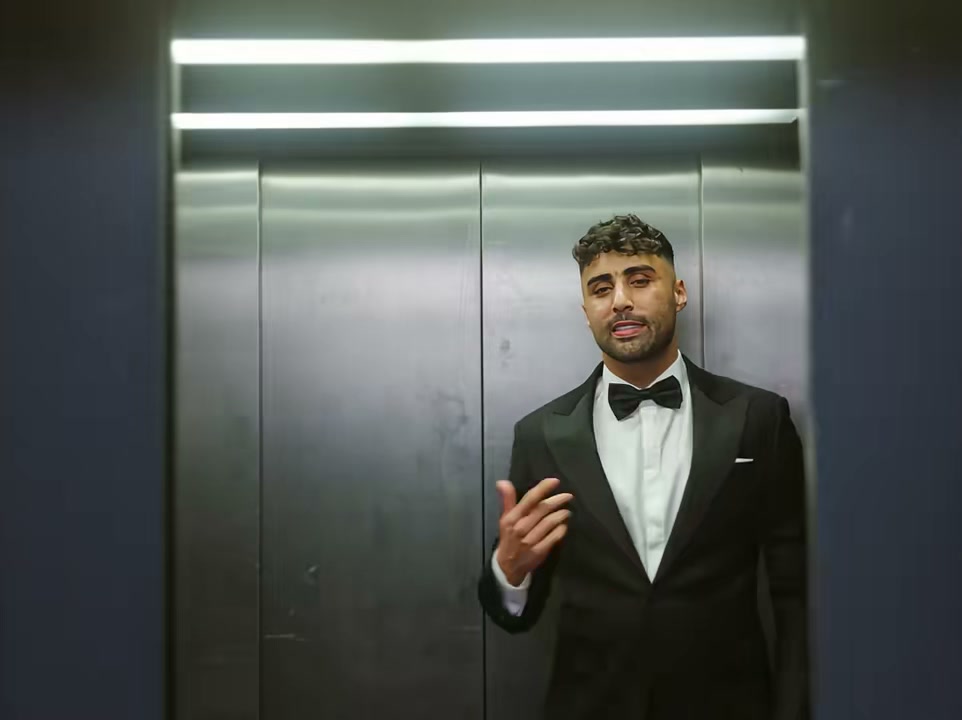
This frame shows the right-hand spot where photo 2 goes, before anyone walks into the lift.
"Match the timing of @Video1…": Give Every Second a Job
Starting with "Match the timing of @Video1", this part's a clock: it tells the edit what happens at each second of the take.
- 0 seconds: The doors open on the person in @Image2 alone inside, "singing to the camera with a raised hand".
- 1 second: The person in @Image1 "walks in on the left with their back to the camera".
- 2 to 4 seconds: The person who walked in turns around to "push a white wired earbud into their ear, and glance at their phone" while the singer keeps going with hand moves.
- 5 to 13 seconds: The person on the left stays put to "stand still and tuned out, eyes half shut or neutral, never reacting" while the singer continues with hand gestures and leans toward the lens.
"Only the person in @Image2 mouths the song" moment by moment with hand gestures around 0s, 4s-6s, 9s, and 12s-13s. Meanwhile, the person in @Image1 "keeps their lips closed throughout".
"Both match the original expressions without exaggeration." means your faces don't play it bigger than the take does. The beats take 116 of the 309 words, so more than a third of the prompt is about timing.
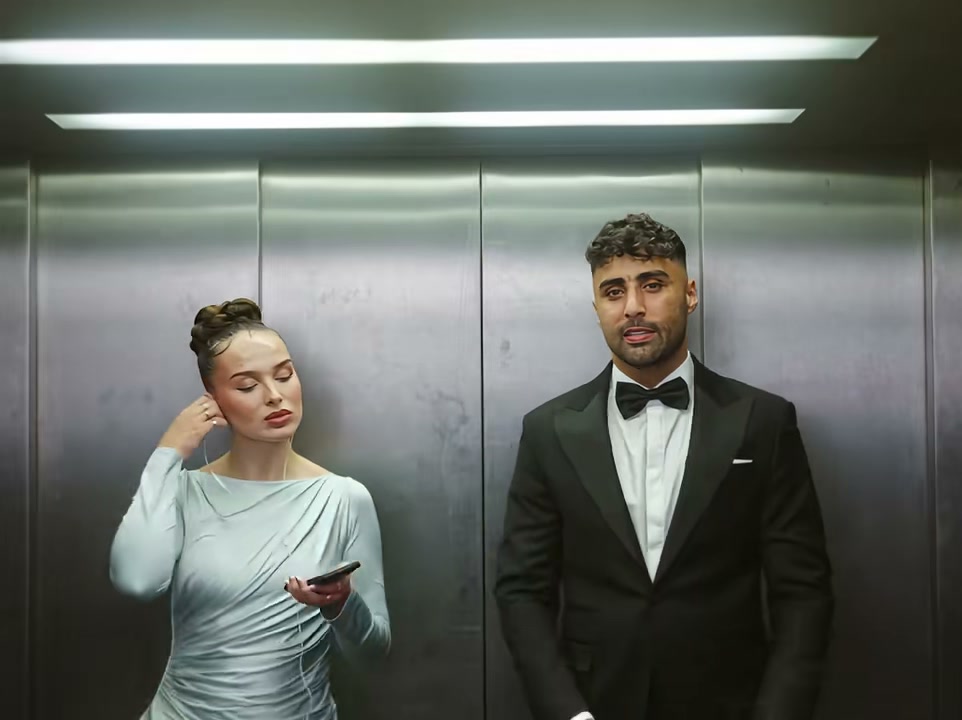
Here's the earbud going in, inside the 2 to 4 second window that the prompt times.
"Keep the brushed-steel lift panels…": Lock the Lift and the Camera
Opening with "Keep the brushed-steel lift panels and doors", this 49-word part's job is to keep 11 things just as you see them in @Video1 across four groups.
- The lift: You keep the brushed-steel lift panels and doors, the two ceiling strip lights, and the doors sliding open at the start.
- The props: You keep the phone and the white wired earbuds on the person in @Image1.
- The camera: You keep the lighting, camera position, a push-in (the camera easing a little closer), framing, lens and motion blur from @Video1.
- The timing: You keep the timing of the take just as it runs.
The sentence finishes "with exactly two people and nobody added", so there's nobody extra in the lift.
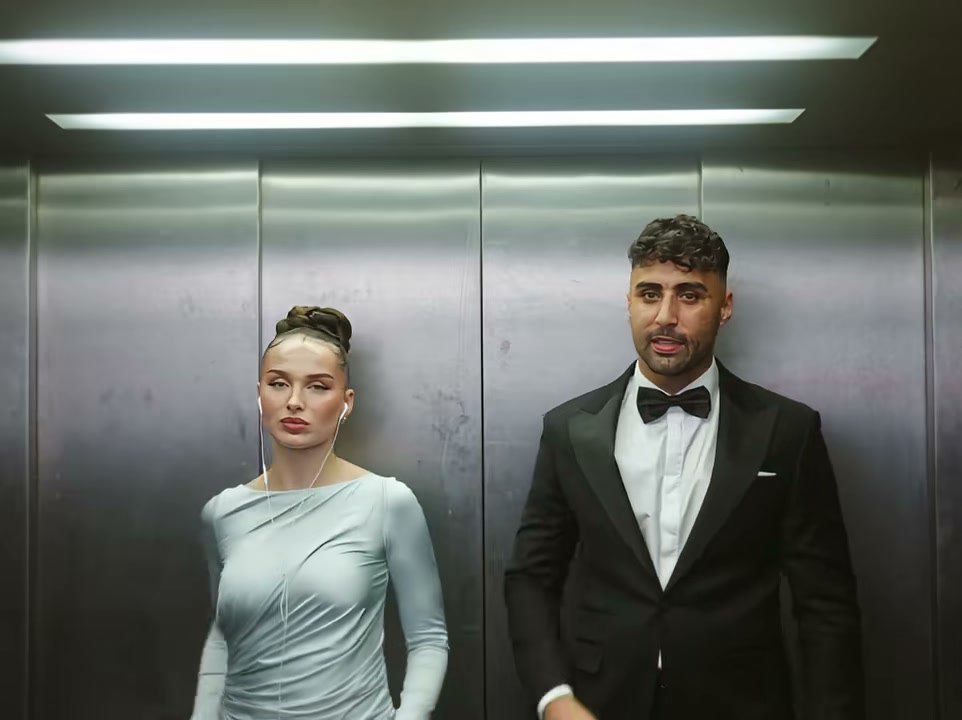
This frame shows the steel lift, two ceiling strip lights and two people that the keep list holds in place.
"Produce a clean, sharp, true-to-life image": Finish on a Clean Frame
Starting with "Produce a clean, sharp, true-to-life image", the last 37 words ask for "clear detail on both faces" and no added text or graphics.
The take has no captions, stickers, logos or overlays on it, and the prompt keeps the frame clear of them. You'll add your own caption in TikTok or Reels when you post.
Skip the 365 Elevator AI Prompt: Two Photos on 365 Elevator AI
365 Elevator AI for TikTok and Reels makes the same 365 elevator AI video from two photos. The 14-second take, the 309 words and the first 14 seconds of "365" are already built into our generator.
On the screen, the Walks in pin acts as @Image1, and the Sings pin acts as @Image2.
- Walks in: You put photo 1 on this pin on the left, which carries the Required tag. You also check the box confirming you have the right to use the photos and everyone is 18 or older.
- Sings: You put photo 2 on this pin on the right (tagged Required), and you can drag one circle onto the other to swap the two photos.
- 720p or 1080p: You pick your resolution on the switch, with 720p picked when the page opens next to the "14s · 4:3" chip.
- Create · $9.90: You press this button to start, and it shows $9.90 for 720p before you pay.
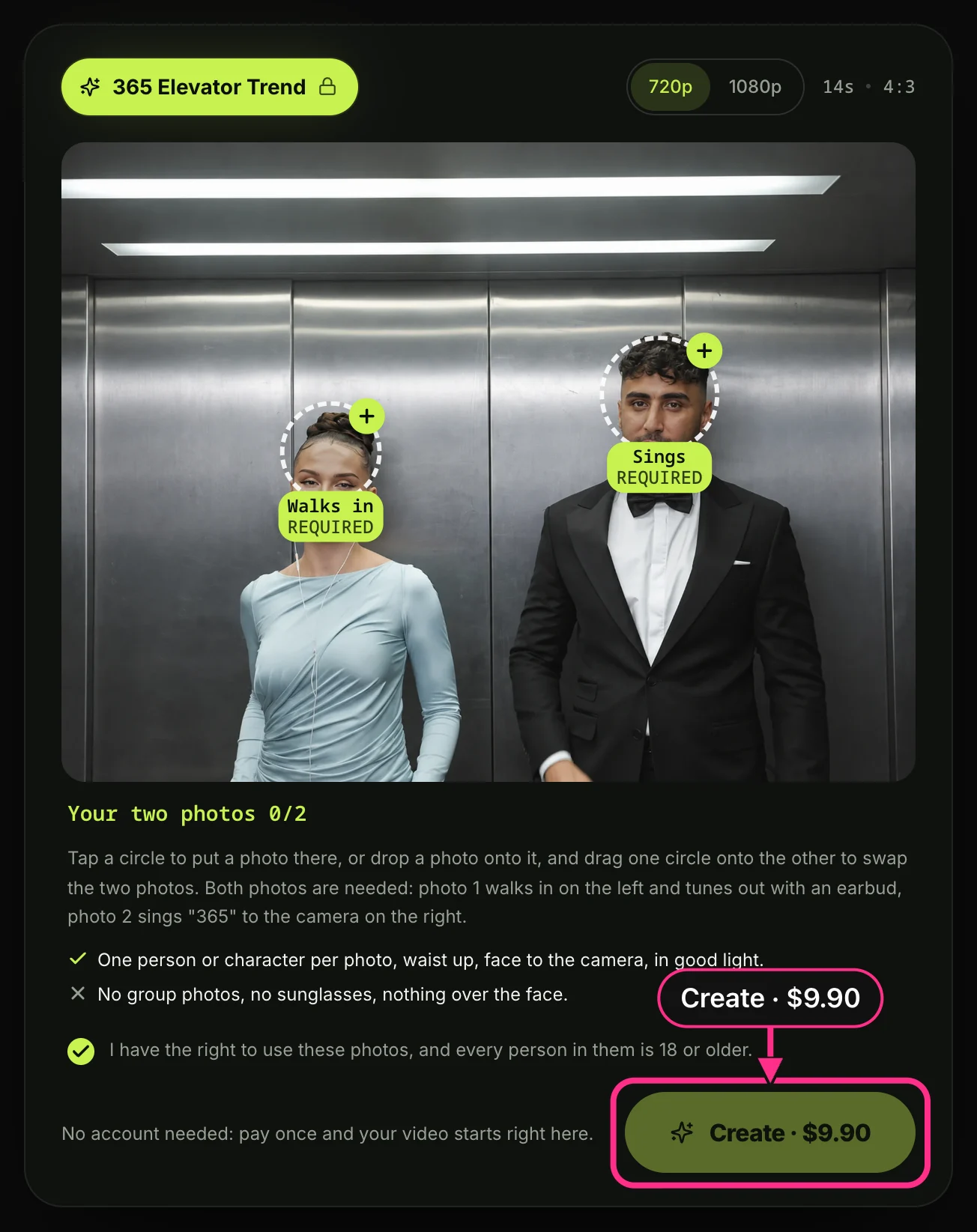
This picture shows the two pins on the elevator still, the 720p choice, the "14s · 4:3" chip and the Create · $9.90 button.
When you press Create as a guest, you don't need an account or an email up front. You see a one-time pack of 500 credits for $9.90. The page states "Your render is saved — it resumes right after checkout." Once you pay, it says "Payment received. Your video has started." You'll find your MP4 on the page, in My videos or through the sign-in link in your checkout email.
- 720p: One 14-second 720p video is $9.90 from the 500-credit pack.
- 1080p: At 1080p, one video takes 1,480 credits from your balance.
- Credits: Credits stay valid for 12 months with no renewal.
- A failed video: If a video fails, its credits come back automatically.
You can view every credit pack on the pricing page. You can also follow the walkthrough on how to do the 365 elevator trend.
What You Need Before the 365 Elevator AI Prompt Works
Running the 365 elevator AI prompt yourself takes 4 things, and you'll want them ready before you start.
- An edit tool: You need an AI video editor that takes one video to change, two pictures and a box for a written prompt. It's not a tool that builds a new scene from one still.
- The 14-second take: You need the 14-second 4:3 post by @neoausdermatrix33 from 21 November 2026 as @Video1. Don't use a copy with text or stickers on top; use it clean, with the sound off for the edit.
- Two photos: You need photo 1 for @Image1 (the one who walks in) and photo 2 for @Image2 (the one who sings), following "One person or character per photo, waist up, face to the camera, in good light."
- The song "365": You need the first 14 seconds of the "365" sound, laid under the edited video from its first second once the edit's done.
Follow these 5 steps in order when you're running the prompt on your own.
- Load the 14-second take as @Video1 into the edit tool.
- Attach your photo 1 first as @Image1, then your photo 2 as @Image2.
- Paste all 309 words of the 365 elevator AI prompt without changing a word.
- Keep the 4:3 frame if the tool asks for a shape.
- Lay the first 14 seconds of "365" under the edited video from the first second.
The 365 Elevator AI generator already holds the tool, the take and the song. So two photos are all you bring to turn the 309-word edit of the 14-second take into your video.
Why Stare Prompts Miss the 365 Elevator Joke
Many 365 elevator prompt examples online stage a walk-in where both people stare at the camera. That isn't what happens in the 14-second take.
Media.io runs a prompt page that ends on blank expressions. Its main walk-in prompt has both people "look straight into the lens with blank expressions". It also says "Hold that look for one second."
For that walk-in, it says to "use a compatible mode that accepts two identity images and a motion reference". For the song, it tells you to "select Sampagne's "365" from your posting platform's music library if it's available", while simpler prompts start from "a two-person elevator image".
Watch the 14-second take itself and you'll see one person sing "365" to the camera with hand moves for all 14 seconds. The other puts in a white wired earbud and tunes out. A prompt that starts from a picture doesn't edit this take: it builds a new elevator, while the 365 elevator AI prompt edits the take itself.
365 Elevator AI Prompt Mistakes to Avoid
Six mistakes come up often when you run the 365 elevator AI prompt for TikTok on your own. Each one's got a fix in the prompt or your setup.
Don't Swap the Outfit Descriptions for Names
The prompt points to each spot by side and clothes from the take rather than names. Don't cut the clothing descriptions: they're how each photo finds its spot.
Don't Let the Two Trade Sides
Photo 1 walks in on the left and photo 2 sings on the right, since "They never swap places". To change who sings, swap which photo is @Image1 and which is @Image2. On our generator, you can drag one circle onto the other.
Don't Ask Both People to Sing
Only the person in @Image2 mouths the song, while the person in @Image1 keeps their lips closed. Don't touch that split: one person sings, the other tunes out, and that's the joke.
Don't Trim the Last Two Parts to Save Words
What stays and the clean frame take 86 of the 309 words, ending "with exactly two people and nobody added". Don't trim them: they're what keeps the lift, the props, the camera and both sharp faces in place.
Don't Use a Group Picture
Crop each person out of a group picture into their own picture and attach the two crops instead of using one group picture. Use the photo hint: "One person or character per photo, waist up, face to the camera, in good light."
Don't Paste It Into a Photo-to-Video Tool
You'll want an edit tool that changes a video you've already got rather than a tool that makes a new clip from a single picture. You can compare options in the best 365 elevator AI generators.
When you want to skip manual setup, put your pair in the 365 elevator and let our generator handle the take, the prompt and the song.
365 Elevator AI Prompt Questions
What do @Video1, @Image1 and @Image2 mean in the 365 elevator prompt?
@Video1 is the 14-second elevator take being edited, not a CapCut template. @Image1's the first photo you attach for the person who walks in. @Image2 is the second photo for the person who sings.
Why does the prompt describe the original outfits instead of names?
The prompt points to each spot in the take by side and visible clothes, with no names anywhere in its 309 words. That's what ties each photo to its exact place in the scene.
Does the 365 elevator AI prompt add the song?
No, it doesn't: the prompt only changes the picture, so you lay the first 14 seconds of "365" under the edited video afterwards.
Sampagne, a German rapper (@sampagnebaby on TikTok), released "365" on 12 November 2026. The sound sat under 8,277 TikTok videos on 25 November 2026. You can check the 365 Sampagne AI page, and on 365 Elevator AI the song is already under your video.
Can both people come from the same picture?
Yes, once you crop them apart. Crop each person from a shared picture into their own photo and attach those two crops instead of one group picture. Each pin takes one person from its own photo.
Why does the person who walks in keep their lips closed?
Only the person on the right sings "365", while the person who walks in tunes out and never reacts. That split's the joke, and it comes from the 10 November 2026 elevator clip by @sampagnebaby and the 14-second beats in the prompt.
Let 365 Elevator AI Run the Prompt for You
The 365 elevator AI prompt we run is a 309-word edit of the 14-second take that puts two photos in place of the two people while keeping everything else. And you don't have to paste it: our generator runs it for you. Put one photo on each pin, keep 720p, and press Create to make a 365 elevator AI video for $9.90.
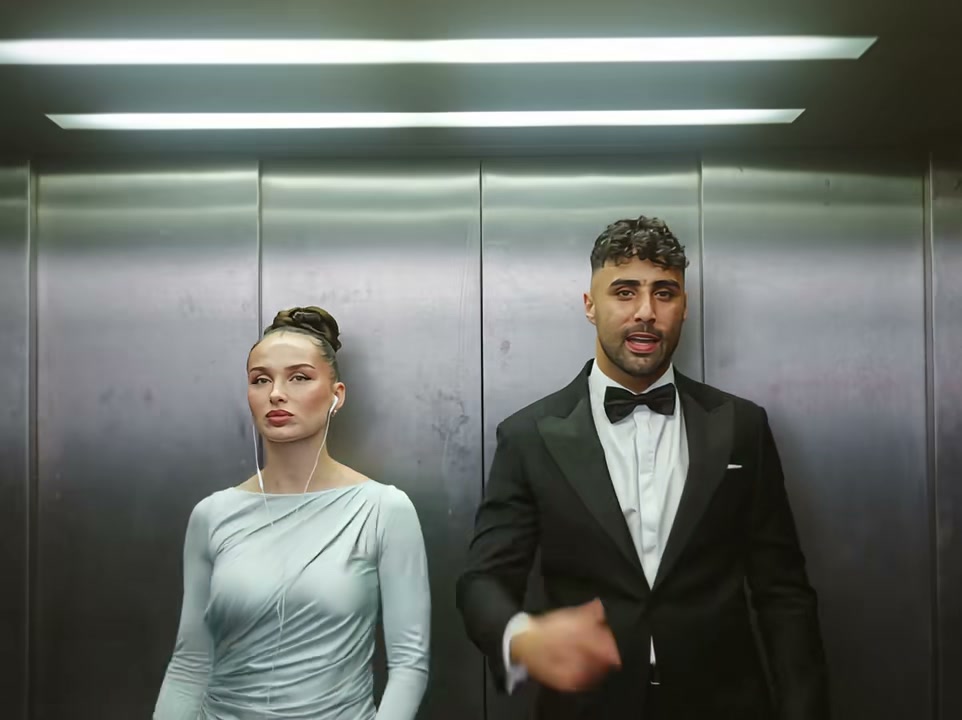
This frame shows the closing hand move from the take while the person who walked in stays still with the earbud in.
Related Articles
- How to Do the 365 Elevator Trend With Two Photos (No Filming) — two pins, one tick and the Create button, step by step.
- 365 Elevator Trend Explained: Who Sings, Who Tunes Out — Sampagne's song, the elevator clip and the duo edits that followed.
- 365 Elevator Trend CapCut Template Not Working? 5 Fixes — the templates the tutorials link, and what to do when they don't work for you.
- Best 365 Elevator AI Generators (2026): 6 Tools Checked — which tools keep the 14-second take and which build a new elevator.


